
By Wayne Mathews — originally published in COMPUTE!’s Gazette Issue 2, August 1983
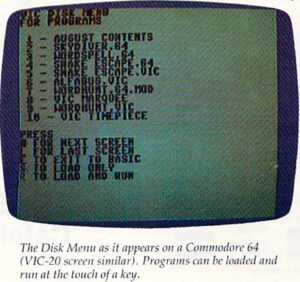
“Load-and-go” disk menu programs are popular with users of all types of computers. Now there’s a version for the VIC-20 and Commodore 64.
The VIC-1540/1541 Disk Drive is a great boon to computing. But when you have a large number of programs on a single disk, the task of loading and listing the directory to find a certain program leaves much to be desired. I originally started this program to create a neater directory display, and then added the autoload and autorun features. The program is easy to use and self-explanatory.
How It Works
The “directory peeper” (starting at line 150) opens the “$” (directory) file and then reads character by character until it comes to quotes. The first word enclosed in quotes in the directory is the name of the disk, and each subsequent name is that of a file. These are collected in the P$ array.
To load or load and run programs, first the LOAD statement is printed on the screen. Then the cursor is moved up three lines so that it falls on the line of the LOAD statement after the program ends. Line 510 shortens the file name so that the load statement fits on one line if the name is long. The rest of the program automatically executes a RETURN (for the load option), or a RETURN-RUN-RETURN (for load and run). The program then ends, the keyboard buffer is emptied, and the program is loaded. If load and run was selected, the keyboard buffer continues to empty, and the program is run.
The program does not discriminate between programs and other types of files. For my own use, this is an advantage because I can examine the names of data files with the menu program. If you don’t want data files listed, the directory peeper can be modified so that byte 0 of each file entry is examined to determine the file type, and only the program files will be loaded into the P$ array.
Since the locations of the keyboard buffer and the number of its characters are the same in the Commodore 64 as in the VIC, this program works with the 64 as well. Line 510 could be deleted and the LOAD statement would fit on the Commodore 64’s 40-column screen. Also add POKE 53281,1 in line 110 for a more readable display on the 64.
The current menu will hold 100 programs. If this number is not suitable, you should change the value 100 in lines 140 and 330.
The autorun can also be used to chain programs, with one program loading the next, or loading a menu which ties together several related programs.
If the menu program is saved as the first program on the disk, it can be loaded using the statement LOAD “*”,8.
See program listing on page 113.