
By Harry E. Watts — originally published in COMPUTE!’s Gazette Issue 2, August 1983
Drawing a run-around border with color and sound can add interest to any program title. As teacher and novice in computer programming, developed programs on VIC-20 for use in my classes. After critiquing my work, it was apparent that the programs needed nice-looking title screen. The demonstration program shows how border can enhance your title and give professional touch to any program. The border subroutine can also be used for directions, ending programs, or wherever emphasis is needed.
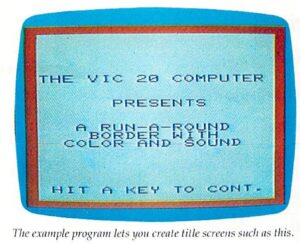
Line 10 is the start of the program, which branches to the border subroutine at line 1000, which clears the screen and sets the border color. The color is defined by the variable C. Remember that the character color is one number less than the keyboard color keys.
Line 1010 sets the volume for the speaker and starts the loop for the top border. Line 1020 POKEs in the screen characters. The demonstration program uses reverse space (160) to achieve a solid border. A border can be customized to the content of the program by using any screen display code. Many interesting effects can be achieved.
Line 1030 POKEs in the screen character color, and line 1040 adds the sound. The program plays low to high notes on musical scale. Line 1050 creates short duration period for each musical note and completes the main loop for the top border. Lines 1060 to 1200 generate the right, bottom, and left borders in the same manner. Line 1210 turns off the speaker and sets the volume to 0. Line 1220 RETURNs to the main program.
At this point the title will pop on the screen, giving dramatic effect. Notice the proper spacing of the title. Remember that the screen display is 20 characters wide by 21 lines with the border. A GET statement in some form should be used to prevent the cursor from crashing the border. The demonstration program uses simple “Hit a key to cont.”
Random colors can also be used in the border subroutine by substituting the following for in line 1000:
DEF FNA (C) = INT(RND(1)*8)
Then change in lines 1030, 1080, 1130, and 1180 to read FNA(C).
10 GOSUB 1000
20 PRINT”{5 DOWN} {RIGHT} THE VIC 20 COMPUTER”
30 PRINT”{2 DOWN} {6 RIGHT} PRESENTS”
40 PRINT”{2 DOWN} {3 RIGHT} RUN-A-ROUND
50 PRINT”{5 RIGHT} BORDER WITH”
60 PRINT”{3 RIGHT} COLOR AND SOUND”
70? PRINT”{5 DOWN} {RIGHT} HIT KEY TO CONT.”
80 GET A$:IF A$=””THEN 80
100 END
1000 PRINT”{CLR}”:C=2
1010 POKE 36878,15: FOR L=0 TO 21
1020 POKE 7680+L,160
1030 POKE 33400+L,C
1040 POKE 36876,155+L
1050 FOR J=1TO25:NEXTJ,L
1060 FOR L=0TO440 STEP 22
1070 POKE 7723+L,160
1080 POKE 38443+L,C
1090 POKE 36876,176+(L/22)
1100 FOR J=1TO25:NEXTJ,L
1110 FOR L=21 TO STEP-1{2 SPACES}
1120 POKE 8164+L,160{2 SPACES)
1130 POKE 38884+L,C
1140 POKE 36876,219-L
1150 FORJ=1TO25:NEXT J,L
1160 FORL=440TO0 STEP-22
1170 POKE 7702+L,160
1180 POKE 38422+L,C
1190 POKE 36876,241-(L/22)
1200 FORJ=1T025;NEXTJ,IJ
1210 POKE 36876,0:POKE 36878,0
1220 RETURN