
By Gregg Peele — originally published in COMPUTE!’s Gazette Issue 2, August 1983
Musicians have coped with the problems of writing and rewriting music passages before Beethoven ever scribbled his scores on parchment. Many an eraser has been demolished while writing music, and many early versions of great masterpieces have ended up in the trash simply because there was no simple way to edit music.
With the advent of word processing, many writers no longer write text over and over again, discarding earlier versions for later improved versions. They simply edit their text to their liking on a screen and then use only the final version. Why not transfer what we have for text editing to the composition of music? The VIC Music Composer does just this – providing a dynamic method of composing, editing, and playing music passages. It provides a creative tool which makes simple music composition a much less frustrating task.
Composing Options
When you first turn on the computer (with the VIC Music Composer cartridge in the expansion port), a menu appears on the screen, prompting you to select one of four modes of operation: Compose, Play, Save, or Load. If you select the Compose mode, you can choose among any of the three tone generators for composition. Next, you are asked whether you want to clear the memory of all the notes that you have previously composed. You are then asked to specify a key signature and the time signature for your composition.
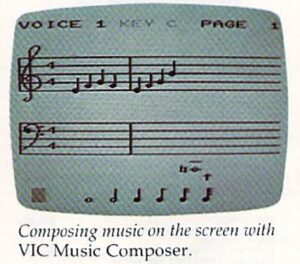
After these preliminary choices are made, the screen displays the grand staff, including both treble and bass clefs. A large red cursor flashes at the bottom of the screen, and seven notes each with a different time duration value are displayed. By placing the cursor over the desired note value and pressing RETURN, you can “lock” the note value directly over an arrow which defines its horizontal position on the screen. The note is then moved up or down the grand staff by using the up/down cursor key. To select the final position of the
note, press RETURN once more.
Once the note is fixed in its position, the screen returns to its original display, plus the note that you have just added. In the same way, you can add rests, bar lines, and dotted notes. The delete key removes any note on the screen. Notes can be inserted merely by moving the arrow to the appropriate place and entering your choice. The number keys (1-6) choose the volume (one is softest; six is loudest).
Instant Playback
Since music on paper (or on the screen) gives the composer only rough idea of how the music actually sounds, VIC Music Composer includes Play mode so you can hear the composition performed. Since the program can display only one voice at time (although it can play all three at time), the Play mode asks you which voice should be displayed during playback. Then you select one of nine different tempos, and the music begins to play.
Other options in VIC Music Composer allow you to save and retrieve music on tape or disk. The program uses all the normal VIC prompts for loading and saving. Once the cartridge is in place, however, there is no way to call the disk directory. If by accident you load BASIC program instead of music file, the system may act unpredictably.
The VIC Music Composer transforms the VIC into an enjoyable instrument for simple music composition. With this tool, music students can create compositions with up to three separate voices and achieve the immediate gratification of hearing their musk performed directly after composition.
VIC Music Composer
Thorn EMI Video
1370 Avenue of the Americas
New York, NY 10019
S39.95