Originally published in COMPUTE!’s Gazette Issue 2, August 1983
Many of the programs which are listed in COMPUTE!’s Gazette contain special control characters (cursor control, color keys, inverse video, etc.). To make it easy to know exactly what to type when entering one of these programs into your computer, we have established the following listing conventions.
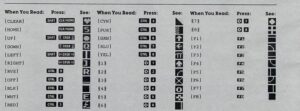
Generally, any VIC-20 or Commodore 64 program listings will contain bracketed words which spell out any special characters: {DOWN} would mean to press the cursor down key. {5 SPACES} would mean to press the space bar five times.
To indicate that a key should be shifted (hold down the SHIFT key while pressing the other key), the key would be underlined in our listings. For example, S would mean to type the S key while holding the shift key. This would appear on your screen as a “heart” symbol. If you find an underlined key enclosed in braces (e.g., {10 N}), you should type the key as many times as indicated (in our example, you would enter ten shifted N’s).
If a key is enclosed in special brackets, {}, you should hold down the Commodore key while pressing the key inside the special brackets. (The Commodore key is the key in the lower left corner of the keyboard.) Again, if the key is preceded by a number, you should press the key as many times as necessary.
Rarely, you’ll see a solitary letter of the alphabet enclosed in braces. These characters can be entered on the Commodore 64 by holding down the CTRL key while typing the letter in the braces. For example, {A} would indicate that you should press CTRL-A. You should never have to enter such a character on the VIC-20, but if you do, you would have to leave the quote mode (press RETURN and cursor back up to the position where the control character should go), press CTRL-9 (RVS ON), the letter in braces, and then CTRL-0 (RVS OFF).
About the quote mode: you know that you can move the cursor around the screen with the CRSR keys. Sometimes a programmer will want to move the cursor under program control. That’s why you see all the {LEFT}’s, {HOME}’s, and {BLU}’s in our programs. The only way the computer can tell the difference between direct and programmed cursor control is the quote mode. Once you press the quote (the double quote, SHIFT-2), you are in the quote mode. If you type something and then try to change it by moving the cursor left, you’ll only get a bunch of reverse-video lines. These are the symbols for cursor left. The only editing key that isn’t programmable is the DEL key; you can still use DEL to back up and edit the line. Once you type another quote, you are out of quote mode.
You also go into quote mode when you INSerT spaces into a line. In any case, the easiest way to get out of quote mode is to just press RETURN. You’ll then be out of quote mode and you can cursor up to the mistyped line and fix it.
Use the following table when entering cursor and color control keys: