By Paul F. Schatz — originally published in COMPUTE!’s Gazette Issue 2, August 1983
One of the Commodore 64’s intriguing features is a high resolution graphics mode, which divides the screen into 64,000 dots, or pixels. By turning these pixels on and off, you can create finely detailed pictures and charts. But because BASIC lacks special graphics commands, only more advanced programmers could use this mode – until now. This article is a breakthrough in that it shows how to add simple graphics commands to BASIC which anyone can use.
Although the high resolution graphics potential of the Commodore 64 is outstanding, accessing and plotting on the hi-res bitmap (320- by 200-pixel resolution) is inefficient and cumbersome from BASIC.
First, BASIC subroutines for calculating and turning on a specific bit can be confusing and intimidating, especially to novice programmers, since the routines require PEEKs, POKEs, ANDs, and ORs. Second, the routines are slow; many BASIC commands need to be interpreted and executed to plot one point. Third, the bitmap has to be located in memory otherwise used by BASIC. The BASIC program space is limited since it is chopped up and some areas are unusable for BASIC programs.
One solution to all of the above shortcomings is to add some new commands to BASIC which drive the high resolution graphics. This article will describe a method for adding four commands.
Modifying BASIC
Since there is Random Access Memory (RAM) under the BASIC Read Only Memory (ROM), we can copy an image of BASIC into RAM and then modify it to suit our needs. I have modified BASIC by substituting four new commands, HUE, PLOT, WIPE, and SCREEN, in place of four seldom-used commands: LET, WAIT, CONT, and VERIFY.
Briefly, here’s how the new commands were added to BASIC. First, notice that the new keywords are the same length as the keywords they replace. A new keyword has to be mapped exactly into an old keyword’s spot in the keyword lookup table. Next, the pointers to the old BASIC routines are changed to point to the routines for the new keywords. Finally, the error message routine is modified so the computer switches to the normal character display if an error is encountered during execution of a program.
A Note To Programmers
The graphing routines were developed with an eye on giving up as little of the BASIC program memory as possible. Not a byte has been lost. This was accomplished by using the RAM memory under the Kernal ROM for the bitmap. Bitmap plotting at this location can only be done properly using machine language routines, since the interrupts have to be turned off and the Kernal ROM switched out to PEEK at the RAM memory. The video matrix, used for the background and foreground color nybbles, is located at $C000 and the machine language graphing routines extend from $C400 to $C545.
The New Commands
The four new commands, SCREEN, HUE, WIPE, and PLOT, are explained below.
• SCREEN <number>
This statement turns on and off the high resolution bitmap. If the number is 1, the bitmap is displayed. If the number is 0, the normal character screen is displayed. Any value other than 1 or 0 will give an ILLEGAL QUANTITY ERROR.
• HUE <number>, <number>
This statement determines the colors displayed on the bitmap. The first number defines the foreground color (color displayed for bits set to 1). The second number defines the background color. A number 16 or greater will give an ILLEGAL QUANTITY ERROR. The color codes are:
0 Black 4 Purple 8 Orange 12 Gray2
1 White 5 Green 9 Brown 13 Light Green
2 Red 6 Blue 10 Light Red 14 Light Blue
3 Cyan 7 Yellow 11 Gray1 15 Gray3
• WIPE
This statement causes a high-speed clear of the bitmap. All the bits are set to zero and the screen is cleared.
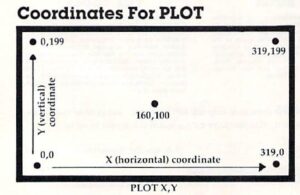
Coordinates For PLOT
• PLOT <number>, <number>
This statement sets a bit on the bitmap, causing the corresponding pixel on the screen to be displayed in the foreground color. A coordinate system with an origin (0, 0) at the lower-left corner is used (see the figure). The first number is the horizontal position relative to the origin, and the second number is the vertical position relative to the origin. The first number can have values from 0 to 319, and the second number can have numbers from 0 to 199. Numbers outside these ranges give an ILLEGAL QUANTITY ERROR.
Loading In The New BASIC
The new BASIC is loaded into the Commodore 64 by entering and running Program 1. When entering the program, be accurate, since an incorrect number may cause the computer to crash (forcing you to switch it off and on to clear it). To be safe, SAVE the program before running it for the first time. A checksum is included to warn if there is a mistake somewhere in the DATA statements. It will take the computer a minute or two to run the program. To enable the new BASIC, enter:
POKE 1,54
The new BASIC can be disabled by pressing the RUN/STOP and RESTORE keys simultaneously or by entering:
POKE 1,55
When entering programs using the new graphics commands, the new BASIC must be enabled so the tokenizing routine will recognize them. The commands they replaced will no longer work unless the new BASIC is disabled.
Some Simple Programs
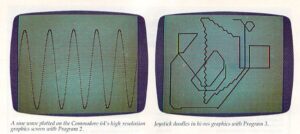
We are now ready to enter and run a couple of simple programs using the new BASIC. First, a simple sine wave. Load and run the new BASIC, type NEW, switch on the new BASIC, and enter Program 2.
Now type RUN and watch the sine wave appear. Wasn’t that easy? Compare this program with the one in the Commodore 64 Programmer’s Reference Guide (pp. 122-26) for ease of programming and speed of execution.
Now, how about a joystick-driven doodle pad? Be sure Program 2 is saved. Then type NEW and enter Program 3. Plug a joystick into port two.
Only The Beginning
Programs written with the new BASIC can be loaded and saved in the normal fashion (but remember, we did away with VERIFY). My purpose was to provide a useful rudimentary graphing tool and to demonstrate the ease with which BASIC can be modified to include new commands. There are numerous extensions of both aspects which could be implemented. For example, a high-speed line drawing command, LINE; or a new command similar to the ON-GOTO statement but with the branching determined by the joystick position, i.e., JOYGOTO, or JOYGOSUB…