
By Charles Brannon — originally published in COMPUTE!’s Gazette Issue 2, August 1983
Your VIC-20 or Commodore 64 has a lot of powerful features including color, sound, graphics, and the processing power of the 6500 series microprocessor. But without the proper “recipe,” or program, your computer will merrily blink its cursor, forever awaiting instructions from you.
Commodore computers have a powerful built-in programming language, BASIC, which has an English-like style and about 50 commands. With the commands you can build almost any program. But since it is such a general-purpose language, it may take you a while to learn all its subtleties and variations.
There are other languages, however. A universal rule is that you can program the same idea (algorithm) in any programming language.
A Teacher Tool
PILOT, an acronym for Programmed Inquiry, Learning, Or Teaching, was first created as an “authoring language.” It was designed to allow teachers to create computerized lessons, quizzes, tests, etc. PILOT’s strength is in word manipulation. Properly programmed, it can tell what a student meant to say, not the verbatim response that most programs require.
PILOT is very easy to learn, since it has relatively few, single-character commands. See if you can follow the program below (T: means Type, similar to PRINT in BASIC. A: (Accept) is like INPUT):
T: WHAT IS YOUR NAME?
A:
T:PLEASED TO MEET YOU.
E:
When RUN, it will print the message “WHAT IS YOUR NAME?” and will await entry from the person RUNning the program. With PILOT, you don’t have to say where the answer will be stored in the computer. PILOT will temporarily “remember” it. E: is for End.
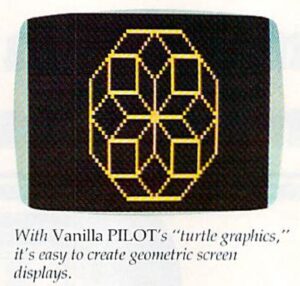
Since PILOT is so easy to learn, it has become the vehicle for language extensions which make it an ideal beginner’s language, and a powerful graphics language. Graphics usually consist of “turtle graphics,” in which you direct an invisible turtle to raise and lower an imaginary pen, draw lines, turn, move without drawing, etc. A sample turtle command to draw a box would be:
4 (DRAW 10 ; TURN 90)
This tells the turtle to draw a line ten units long, rotate 90 degrees, and repeat the sequence four times. The result would be a box. Looks simple, huh? Turtle graphics is a fascinating, complex field in itself.
Vanilla PILOT is a well-developed PILOT language which will run on all current Commodore computers (the VIC-20 needs an additional 16K RAM cartridge). It comes with a complete editor that lets you enter programs as easily as in BASIC. In addition, there are commands that generate line numbers, return to BASIC, search the program for some text, save and load programs to tape or disk, delete program lines, LIST your program in a format, display all the variables you are using, trace the program line by line, renumber your program, and even un-NEW a cleared-out program.
PILOT Extensions
In addition to “core PILOT,” Vanilla PILOT adds scores of new commands to make programming more powerful and fun. The B: (Beep) command supports all the voices on the VIC, and most synthesizer options on the Commodore 64. The variables are a little limited, only A through Z and two strings: the answer field and the name field, so called because you’ll probably store the user’s name in it. H: (Halt) will stop your program. One strange limitation of the J: (Jump) command is that you cannot place a label by itself on a line. The N: command will place a random number from 0 to 99 in a selected variable. The P: (Pause) command will freeze the computer for a multiple of 0.2 seconds, maximum 2.7 seconds. The R: (Remark) lets you comment on your program. W: (Wait) is like GET in BASIC, and will look for a keystroke.
One small fault is that the T: (Type) command does not automatically wrap words at the screen margin. This is a standard feature in most versions of PILOT, since it prevents a word from being split at the margin.
There are two powerful commands that have their own sub-commands: S: (Screen), and C:(Graphics). The Screen command lets you move the cursor under program control without using the often confusing cursor controls. You can also clear the screen, home the cursor, set line spacing, reverse the whole screen, and reverse all following T: (Type) statement.
G: Is For Graphics
The G: (Graphics) command and its subcommands are powerful, but little disappointing. First, Vanilla PILOT uses different names for the turtle graphics commands from other PILOTs or Logos. Second, instead of using high-resolution graphics, it uses quarter-square graphics to get a rather crude 80×50 resolution on the Commodore 64 and only 44×46 on the VIC-20. However, this does leave more memory to work with on the VIC. Since the screen colors are set four, 4×4 squares at time, the color control is inaccurate. Another minor discrepancy is that the X, Y coordinates start 0,0 at the upper-left corner of the screen instead of the center, which is the standard of most other turtle graphics languages. Despite these features, you can still learn lot about turtle graphics with Vanilla PILOT, and have lot of fun drawing with the turtle.
PILOT Vs. BASIC
Additional commands read the joystick and the fire button, which is much easier than the PEEKs and POKEs BASIC requires. This is a strong advantage of PILOT vs. BASIC, especially with the B: (Beep) command that “tames” the Commodore 64 sound synthesizer chip.
…Does Not Compute
The error messages of Vanilla PILOT will help you pinpoint the cause of any mistakes, but they can be as cryptic as BASIC’S messages. Instant syntax checking on entry would be nice feature for beginners.
Documentation
The 112-page manual, although lacking an index, is good tutorial on PILOT, so you can learn as you go. Because it covers all the versions of Vanilla PILOT, however, it can be somewhat confusing. The manual is full of illustrative sample programs. There is a short quiz at the end of each chapter, a proven technique, but there are no sample answers. Appendices in the back provide quick reference to the commands, a nicety so few provide. However, there are occasional typos that will frustrate beginners. Although I’ve generated my own programs with Vanilla PILOT, there is still one program in the book that I can’t get to run.
Vanilla PILOT will not be the only PILOT available for Commodore computers. Commodore itself is said to be readying PILOT for the 64. It will be interesting to compare features when it becomes available. There was also ready-to-type, small PILOT interpreter published in the December 1982 issue of COMPUTE! Magazine.
Overall, I feel that Vanilla PILOT is good value for the money, especially if you’re an educator who would like to write programs that will run on all Commodore machines.
Vanilla PILOT
Tamarack Software
Darby, Ml 59828
$29.95