
By C. Regena — originally published in COMPUTE!’s Gazette Issue 2, August 1983
Because of this month’s topic – creating sound – The Beginner’s Corner departs from its usual custom of covering both the VIC-20 and Commodore 64. Since sound is handled very differently on the 64 than on the VIC, this month’s column deals only with the VIC.
Using your computer to play music can be a lot of fun. You may run a program to have your computer play a tune, then you can sing along with the computer. If you play a solo instrument, program the computer to play your accompaniment. If you are learning to play a difficult piece of music, have the computer play the piece so you can tell what it is supposed to sound like. Game programs can be enhanced with musical interludes. Educational programs can use music to reward correct responses. Music teachers and students can use music programs to improve the learning process. Any type of repetitious drill work can be done with the aid of the computer.
To program music on your computer, you need to consider volume (loudness), note (pitch), and duration (length of the note). The VIC-20 allows three channels or voices for music which may be played simultaneously, plus one voice for noises.
Different computers have different commands in BASIC to play music. Other microcomputers may use words such as SOUND and PLAY. In VIC programming the POKE command is used. POKE can be confusing because the form of the POKE statement is POKE n1,n2, where n1 and n2 are numbers and you need to know what type of numbers to use. N1 is a memory location or memory address – a number from 0 to 65535 on the VIC. N2 is a number that you put in the memory location. On the VIC this must be a number from 0 to 255. Depending on the numbers you use, the computer will act. Some POKE statements refer to graphics; others may change a type of computer operation such as speed or disabling certain keys.
Volume
To turn on the volume to play music, the location number is 36878, and the volume setting can be from 0 (off) to 15 (loudest). The volume is ordinarily turned off, so if you happen to forget this statement in your program you won’t hear any music. POKE 36878,15 sets the volume to the highest level.
You may wish to let the numbers be variables:
100 V=36878
110 L=15
120 POKE V,L
300 L=10
310 POKE V,L
500 POKE V,0
Note or Pitch
Even if the volume is turned on, you will not hear anything until you tell the computer to play a note. There are three locations that may be used for the sound channels: 36874, 36875, and 36876. Each voice has a different range of tones available. 36874 has the highest notes. The numbers you can POKE into these memory locations for sound purposes may range from 128 to 255, where 255 is the highest note in each range. There are charts in the book that comes with your computer and in the VIC-20 Programmer’s Reference Guide that translate a note by letter name to the number necessary for computer language.
Let’s try a few notes. Here is a short program to illustrate the commands necessary to play a note:
100 POKE 36878,10
110 POKE 36874,183
120 END
RUN the program and you will hear the note A. Notice that even though the program ends, you still hear the note. You need to POKE 36874,0 to end the sound. You may also turn off the volume by the command POKE 36878,0, or by holding down the RUN/STOP key while pressing RESTORE.
Duration
The computer keeps playing note until you change the note or tell the computer to stop. Your program may do calculations or draw pictures while the computer is playing notes (that’s how sound effects are synchronized with graphics in games). There are several ways to make the computer play note for a certain length of time and then change to different note or stop. One method of delay is to use FOR-NEXT loop. A loop looks like this:
20 FOR D=1 TO 10
25 PRINT
30 NEXT
The FOR statement tells the computer to per form the loop the first time with D= 1, the next time with 2, the next time with 3, and so on until is greater than the limit 10 (the last loop will he with D= 10). FOR-NEXT loops are a way of getting the computer to do something many times with only few lines of instructions.
Now, if you delete line 25 above, you will have a FOR-NEXT loop with no commands between, so the computer is just counting from 1 to 10. If you change the 10 to 100, you will notice the loop takes longer to perform. You can get different lengths of time by adjusting the loop limit number. Here is how loops can control the duration of sounds:
10 POKE 36378,12
20 POKE 36875, 207
30 FOR D=1 TO 300: NEXT D
40 POKE 36875, 201
50 FOR D=1 TO 300: NEXT D
60 POKE 36875, 195
70 FOR D=1 TO 600: NEXT D
80 POKE 36875, 0
90 POKE 36878,0
100 END
Keep in mind that with programming there are many ways to accomplish the same thing. Let’s suppose we want to continue the tune in the program above and that most of the notes will use the delay loop of 300. We can use GOSUB to save some typing and memory. GOSUB tells the computer to go to SUBroutine (a small program within your main program) to perform some lines, then RETURN to the statement following the GOSUB. Anytime you do procedure number of times, it may be better to make it subroutine and use GOSUB. Here is an example:
10 POKE 36878,12
20 POKE 36875,207
30 GOSUB 200
40 POKE 36875,201
50 GOSUB 200
60 POKE 36875,207
70 GOSUB 200
80 POKE 36875,215
90 GOSUB 200
180 POKE 36875,0
190 POKE 36878,0
199 END
200 FOR D=1 TO 300
210 NEXT D
220 RETURN
To save typing numbers (and to save memory), you could let 36875. Then every time you need 36875, just type S. In Commodore BASIC you may also leave off the variable in the NEXT statement, and you may combine lines by separating commands with colon. You may also to tokenize or abbreviate POKE by typing P, then SHIFT O. You may also leave out spaces to save memory.
The following program illustrates way to use subroutines and FOR-NEXT loops for various note durations. let GOSUB 56 represent the length need for an eighth note. GOSUB 54 is twice as long and would represent quarter note; GOSUB 52 is dotted quarter note (equal to three eighth notes in time); and GOSUB 50 is used for half note.
1 REM MELODY
2 POKE 36878,15
3 S=36876
4 T=200
5 POKE S,195:GOSUB 52
7 POKE S,187:GOSUB 56
9 POKE S,183:GOSUB 54
11 POKE S,175:GOSUB 54
13 POKE S,163:GOSUB 54
15 POKE S,175:GOSUB 54
17 POKE S,183;GOSUB 54
19 POKE S,163:GOSUB 54
21 POKE S/175:GOSUB 56
23 POKE S,183:GOSUB 56
25 POKE S,187:GOSUB 56
27 POKE S,175:.GOSUB 56
29 POKE S,183:GOSUB 52
31 POKE S,175:GOSUB 56
33 POKE S,163:GOSUB 54
35 POKE S,159:GOSUB 54
37 POKE S,163:GOSUB 50
39 POKE S,0:POKE 36878,0
41 END
50 FOR D=l TO T:NEXT
52 FOR D=l TO T:NEXT
54 FOR D=l TO T:NEXT
56 FOR D=l TO T:NEXT:RETURN
60 END
Notice that line sets 200. If you wish to change the tempo of this tune, all you need to do is change this one line. For example, to make the melody play more slowly, change line to 350 and RUN the program. Now change line to 100 and RUN. All the note durations stay in the right proportion, but the speed is changed.
Following is program for the same melody, but using DATA statements to READ in the note values and the duration factors. Line still sets up variable so you can change the tempo. (I will explain using DATA and READ statements in more detail in future column.)
1 REM MELODY2
2 POKE 36878,15
3 S=36876
4 T=200
5 READ N,A
7 IF N=-l THEN 39
9 POKE S,N
11 FOR D=1 TO T*A:NEXT
13 GOTO
15 DATA 195,3,187,1,183,2,175,2,163,2,175,2,183,2,163,2,175,1
17 DATA 183,1,187,1,175,1,183,3,175,1,163,2,159,2,163,4,-1,-1
39 POKE S,0:POKE 36878,0
41 END
The best way to learn about the music capabilities of your computer is to write your own program. Experiment with the volume to accent certain notes. Try different durations to develop complex rhythms. Try different combinations of numbers with the three different speakers to hear the ranges of tones and try using more than one voice at time to harmonize.
Let’s Learn Notes: The Keyboard
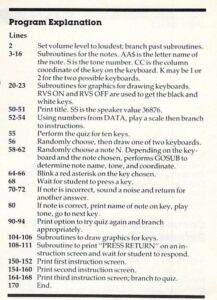
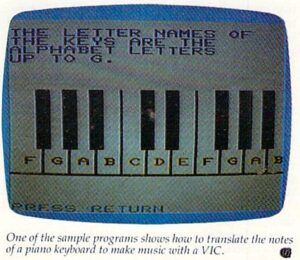
This program, “Keyboard,” is designed for the beginning piano or organ student who is learning the letter names of the notes on the keyboard. A music teacher may use this program before or after a student’s regularly scheduled lesson time.
The program introduces the letter names of the keys on piano or organ keyboard. After the instruction screens, quiz of ten keys is presented. One of two keyboards is chosen randomly, cither keys starting with group of two black keys or keys starting with group of three black keys. A red asterisk appears randomly on one of the keys. The student must press the letter name of the key shown. If the response is correct, the tone will be played for that key. If the response is incorrect, there is short noise and the student must try again.
This program uses graphics to help the instruction. The music capabilities of the computer allow the tones to be played so the student can hear the note as well as see the physical placement.
See program listing on page 125.